Map Colouring
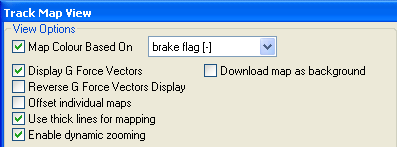
The track map can be coloured for the analysis of any of the variables available in the software. To do this, select the "Options" tab for the Track Map and check the box for "Map colour based on" and select the variable you wish to display:
In this example, the variable "brake flag" has been chosen. When we close the options and look at the map, we get a coloured display of where the vehicle was breaking around the track. "Use thick lines for mapping" has also been selected, this doubles the thickness of the lines displayed for the trace to make it easier to see the trace. This example has also had only one lap selected:
The map now shows a blue trace for where the vehicle was braking, and a red trace for accelerating.
 My basket |
Checkout |
Add to email list
My basket |
Checkout |
Add to email list




 Edit
Edit History
 Print
Print Download (.HTML)
 PDF
PDF