Bitmap control
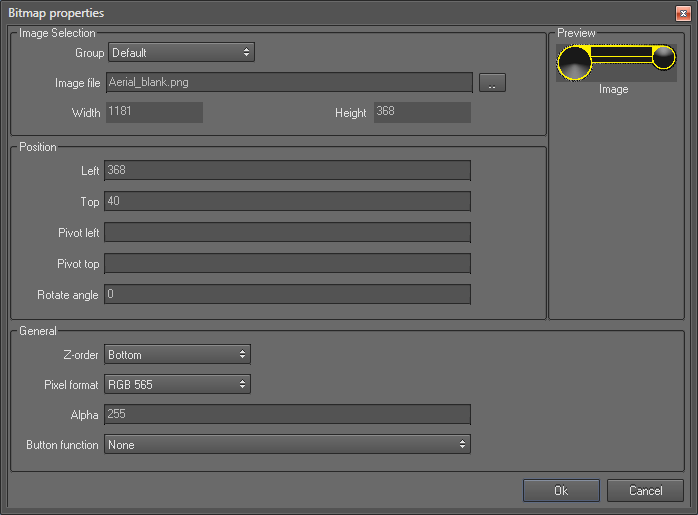
Bit map control is used insert a bit map image into the layout. This control can be used in several ways:
For example:
- To create image needles by setting its rotate angle property using an equation
- As backgrounds of other controls by setting those controls alpha values appropriately.
- To Display or hide an image based on a value of a variable. For an example you can display a warning when you exceed a given speed limit and hide it when you are below that limit.
- To include your company name or logo into the layout
Bitmap control properties
Image selection section
- Image File : Allows you to select an image file from the disk. Once loaded, preview of image will be displayed in the "Preview" area.
- Width and Height : These read only properties display the width and height of the loaded bitmap Image.
Position section
- Left and Top : These are the coordinates of the left and Top borders of the control
- Pivot left and Pivot top:
- Rotate angle : This property represents the angle in degrees to rotate control clockwise or counter-clockwise
General section
- Z-order : this property determines whether bitmap control should be displayed on top or bottom relative to the other controls placed on the overlay.
- Bottom – Control will be placed at the bottom of all controls
- Top - Control will be placed on top of all controls.
- Pixel format :
- Alpha : Allows you to set the transparency of the control. Values may range from 255 (opaque) to 0 (invisible)
- Button functions : You can make this control act as a push button by selecting one of the functions listed in the drop down.
 My basket |
Checkout |
Add to email list
My basket |
Checkout |
Add to email list




 Edit
Edit History
 Print
Print Download (.HTML)
 PDF
PDF