<< Previous, Output serial data
Flash card storage
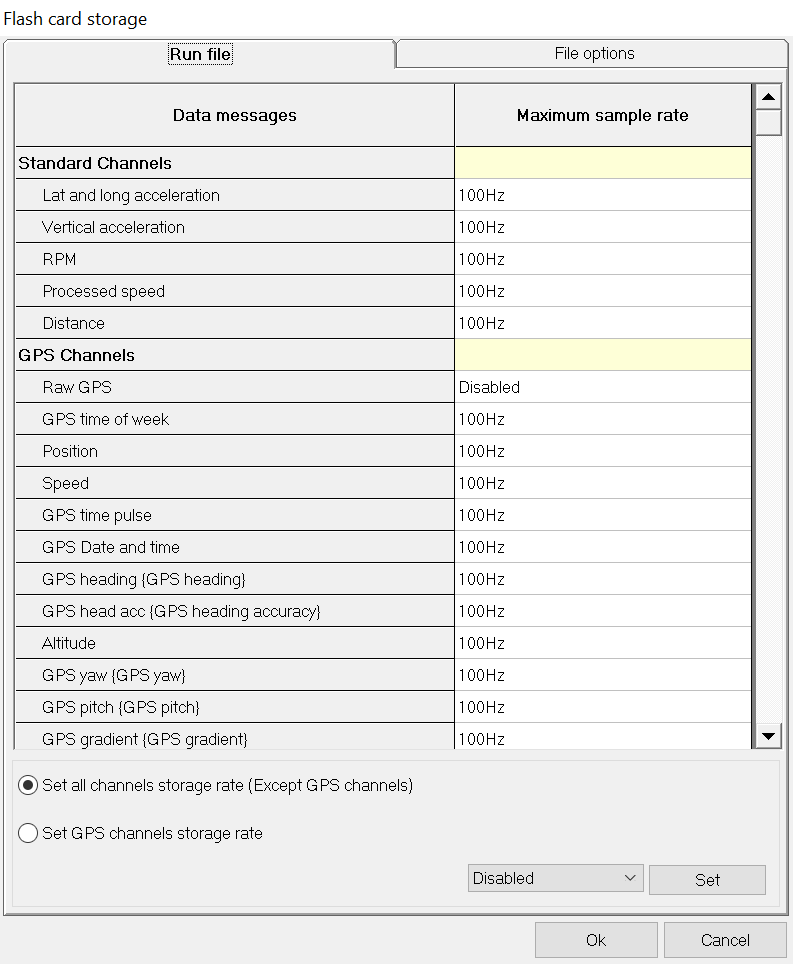
Flash card storage options for the DL1 FD/DL2 FD determine which channels of data are logged to the memory card, as well as the naming of the files. These settings are selected from the Flash card storage icon on the DL1 FD/DL2 FD configuration software:
Variable storage rates
By default, all of the channels of data are set to store as fast as possible. This is 100Hz on all sensors except for GPS, and 20Hz on the GPS data. If internal GPS data is used, the actual maximum data storage rate will be 5Hz as that is the internal update rate.
When certain channels are mapped to come in from the serial or CAN ports, the storage options will include 'ALL', which stores all of the data messages, irrespective of the data rate.
For most applications storage rates can be left as standard. If required, to keep file sizes down to a particular size, it is possible to turn down the rates on individual channels or disable them altogether.
Groups of channels can be set by selecting the yellow box next to the section heading and seting the rate in there.
File options
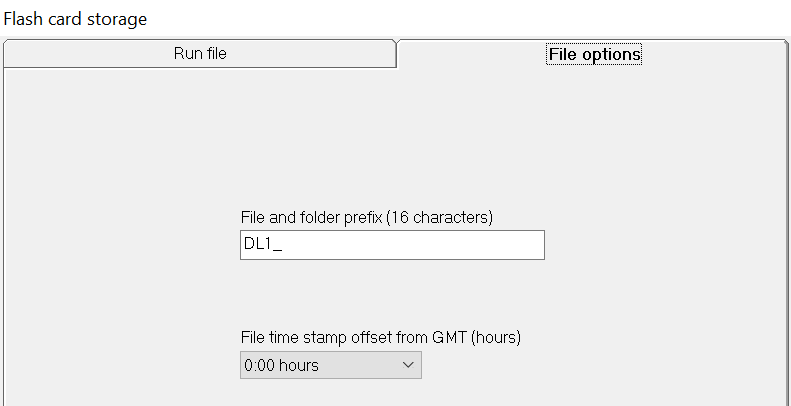
File and folder prefix (16 characters)
The DL1 FD will automatically give files a unique name. You can optionally add a prefix to this name here.
File time stamp offset from GMT (hours)
This should be set to your current timezone, it is used to alter the filename from the time reported by the GPS system to give you a correct local time.
Next >> Automatic logging control
 My basket |
Checkout |
Add to email list
My basket |
Checkout |
Add to email list




 Edit
Edit History
 Print
Print Download (.HTML)
 PDF
PDF