Manually update RT LIVE v2 unit's firmware (reflashing)
The RT LIVE v2 unit updates itself periodically, by checking for the latest firmware on-line and installing it if needed. It is possible to update the unit's firmware manually from the configuration unit, by accessing the reflash option under the "file" menu, but this is only needed in case there is an issue.
1. First connect the RTLive unit to the PC with the Race Technology software package installed.
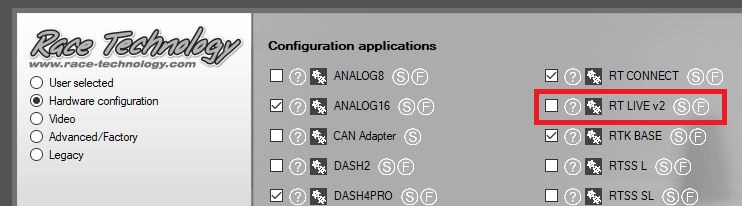
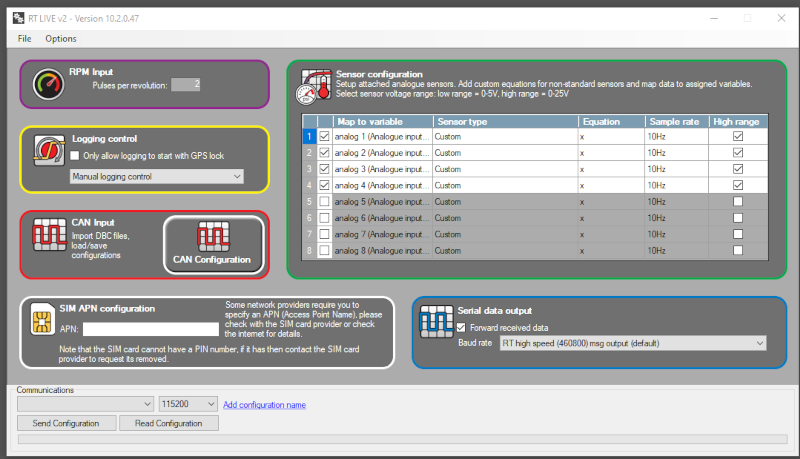
2. Open the Race Technology software launcher and proceed to open the RTLive configuration tool.
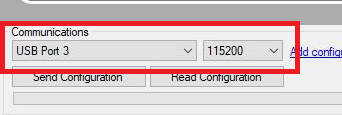
3. Set up the communications port and baud rate.
The port numbers may be different for your PC, below is just an example. If you are using a serial to USB to adapter then this will show up as a USB
port. The standard baud rate is 115200.
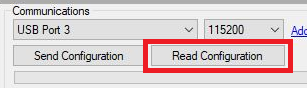
4. Press "Read Configuration" to read back the current settings on the unit.
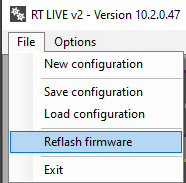
5. Click on the menu item "File > Reflash firmware"
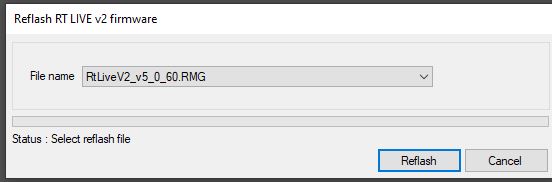
6. A new window will now appear; this lets you select the firmware version to use for reflashing. In almost all situations there will be only one version available to choose. This will be the latest version available.
Choose the firmware version and press Reflash. The unit should now start reflashing.
 My basket |
Checkout |
Add to email list
My basket |
Checkout |
Add to email list




 Edit
Edit History
 Print
Print Download (.HTML)
 PDF
PDF