Reflash and upgrade DASH2 to V10 firmware
IMPORTANT:
- Upgrading to V10 firmware will completely wipe the current configuration of your units.
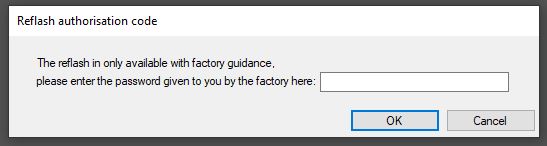
- Before reflashing your unit, please contact Race Technology and follow the instructions provided; then this will be covered within the standard warranty. If you are using DASH2 Configuration software version 10.0.0.31 or higher, you will need to provide an authorisation code from Race Technology to start the reflash
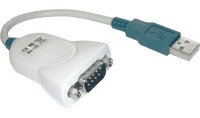
1. Connect your DASH2 unit to the PC directly. This can be done by simply plugging the unit's serial port into the serial port on the computer (if it has one). If the computer does not have a serial port, you will need to use a USB to Serial Adaptor:
2. Power up the unit.
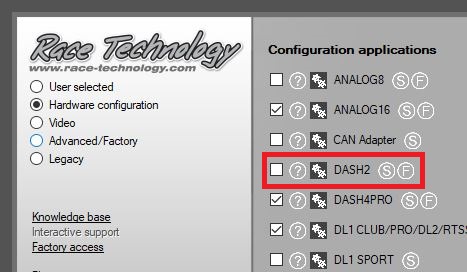
3. Open the DASH2 Configuration software.
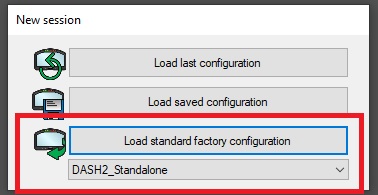
4. Load standard factory configuration as shown below:
5. Open the drop down list in the bottom left under communications and select the correct communications port.
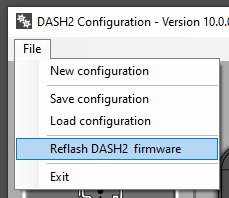
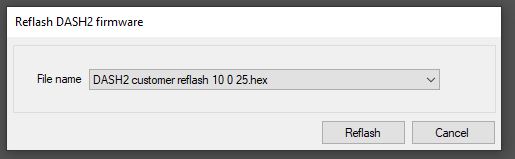
6. Click on the menu command "File -> Reflash DASH2 firmware".
7. Enter the reflash authorisation code to proceed to the reflash dialog.
7. Click "Reflash" to start the firmware upgrade.
 My basket |
Checkout |
Add to email list
My basket |
Checkout |
Add to email list




 Edit
Edit History
 Print
Print Download (.HTML)
 PDF
PDF