Car computer functions
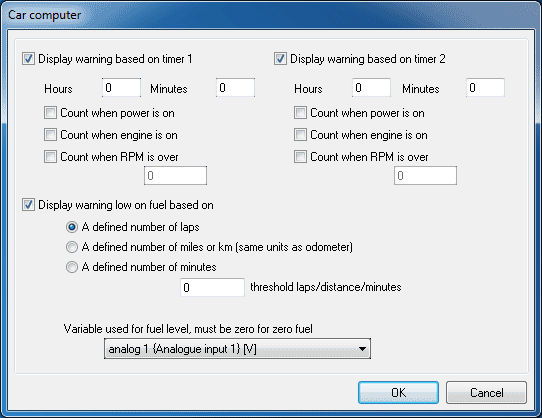
The car computer functions are configured from the PC using the DASH5 PRO configuration software. Open up the software and click on the Configuration -> Car computer functions menu item:
It is possible to enable two time based warnings, based on run time, power on or time over a certain RPM value.
The low fuel warning can be set to number of laps, miles/km or minutes remaining (based on recent fuel usage rates). To set this up the fuel input variable needs to be specified. This variable should give a scaled value which goes down to 0 when there is no fuel remaining.
 My basket |
Checkout |
Add to email list
My basket |
Checkout |
Add to email list




 Edit
Edit History
 Print
Print Download (.HTML)
 PDF
PDF