Mapping Options
Checking for consistency with the GPS data
This option uses the GPS data to check for errors in the accelerometer data, for the speed and position.
Don't combine the data with accelerometers
The GPS data and the accelerometer data can be combined to produce the best quality track maps with smooth corners. Whilst the track map accuracy is improved, the mathematics involved to combine the accelerations and GPS data is quite complex and it takes some time to process the data into a track map. Race Technology products have GPS data sampled quite quickly (5Hz, 10Hz or 20Hz), so the advantage of combining the GPS and accelerometers can be quite marginal in some cases.
Trust accelerometer data over GPS data
This option can be used to try to clean up the track map when the GPS data is not very good. It can work very well on bad GPS data but should be used with care, this option relies heavily on the accelerometers being zeroed at the start of the run.
Remove stationary walk/noise from the GPS data
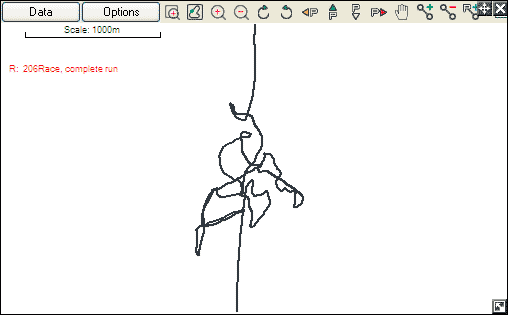
This option is use to remove the GPS data at the start and end of the data logged when the vehicle was stationary, but show some small movement. For example this shows the data logged whilst the vehicle was parked on the starting grid for an extended time:
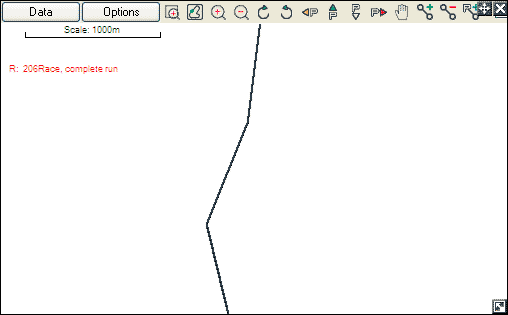
This is the same data, but with the option enabled:
Automatically time align GPS and accelometer data
If this option is enabled then the software processes the GPS speed and the acceleration data to get exactly the correct time alignment. This is done by shifting the GPS speed data back and forth by 1 second and seeing where it best “matches” the measured acceleration. Once the best match is found then all the GPS data is shifted using this information (this includes, speed, position, RTK attitude data, GPS time stamp etc).
Notes:
- for this mode to work correctly the accelerometers should be correctly configured for alignment etc.
- this mode should not be used for short AX22 or SPEEDBOX data as this speed data is already correctly aligned.
Ignore pre-processed speeds and distances
There are 2 ways for speeds and distances to be calculated. In most cases the hardware stores GPS and accelerometer data, and the analysis software combines these to give speed and distance. In some cases, noteably the SPEEDBOX, AX22, and optionally on the DL1PRO speed/distance is calculated in real time and stored. In most application the speeds/distances that are calculated in real time are used in the analysis software, however if the unit was incorrectly installed or configured then it can be desireable to ignore the pre-calculated results and instead calculate them in the software from GPS and accelerometer data.
 My basket |
Checkout |
Add to email list
My basket |
Checkout |
Add to email list




 Edit
Edit History
 Print
Print Download (.HTML)
 PDF
PDF