Life Racing CAN
Compatibility
Configuration
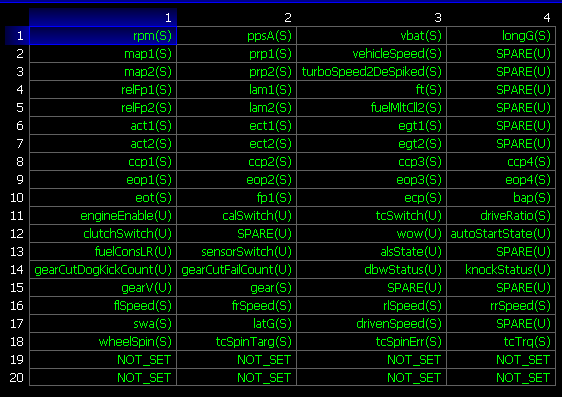
To enable ECU communication it is necessary to set some ECU parameters using “SCal” software:
CanCal.SC file is available from Race Technology at request. This will automatically load the correct CAN settings. Below is the setting if you wish to enter manually.
Connections
This ECU should be connected via CAN connections.
- Connect CAN High from Race Technology device to pin 82 (CAN+) on 88 pin connector.
- Connect CAN Low from Race Technology device to pin 81 CAN-) on 88 pin connector.
Data Channel Listing
| ECU Message Name
| Race Technology Data Channel
| Resolution of Data
|
| rpm_S
| RPM (Engine RPM)
| 1 RPM
|
| vbat_S
| Battery voltage (misc 3)
| 0.001 mV
|
| lam1_S
| Lambda 1 (misc 1)
| 0.001 Lambda
|
| egt1_S
| Exhaust 1 temp (temperature 17)
| 0.1C
|
| ect1_S
| Coolant temp (temperature 8)
| 0.1C
|
| act1_S
| Inlet post intercooler 1 (temperature 6)
| 0.1C
|
| calSwitch_U
| Auxiliary 1 (aux 26)
| N/A
|
| rlSpeed_S
| Auxiliary 4 (aux 29)
| 0.1MPH
|
| eop1_S
| Oil pressure (pressure 2)
| 1mb
|
| eot_S
| Oil temp (temperature 9)
| 0.1C
|
| tcSpinTarg_S
| Auxiliary 3 (aux 28)
| N/A
|
| ppsA_S
| Throttle position (aux 1)
| 0.10%
|
| flSpeed_S
| Auxiliary 2 (aux 27)
| 0.1MPH
|
| fp1_s
| Fuel pressure (pressure 3)
| 1mb
|
Not all channels listed in the table above may be available from your ECU. The available data channels vary with the vehicle model, year of manufacture & connected sensors.
 My basket |
Checkout |
Add to email list
My basket |
Checkout |
Add to email list




 Edit
Edit History
 Print
Print Download (.HTML)
 PDF
PDF