Configuring control properties
Most of the control properties in the Advanced overlay editor can be configured with two values:
- Display value (or default value) and
- formula (run time value).
These two values are separated by using “#” character:
- Default_Value#RunTime_Value
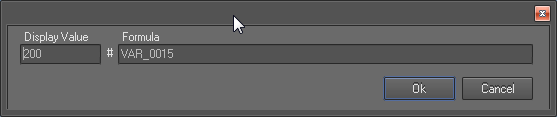
If a property can be configured with both values, double clicking on its input text box will open another dialog as shown below.
- The display value (or the default value) is the hard corded value set at the design time
- Run time value can be any one of the following:
- text string or a number
- an empty value
- A variable: For example to show the speed we can set the variable VAR_0015
- Reference to a custom (user) property definition E.g. [0], [1] …
- An equation
Equations are built by combining of two or more of the following:
- Variables
- Math’s functions
- Conditional statements
- Tags which refers custom property definitions
Example: following equation is used in one of the factory overlays to rotate an image needle bitmap of a RPM dial:
If(VAR_0010>[0];33.5;if(VAR_0010<[1];-123.5;if(VAR_0010>[2];( VAR_0010-[2])/([0]-[2])*33.5;([2]- VAR_0010)/([2]-[1])*-123.5)))
 My basket |
Checkout |
Add to email list
My basket |
Checkout |
Add to email list




 Edit
Edit History
 Print
Print Download (.HTML)
 PDF
PDF