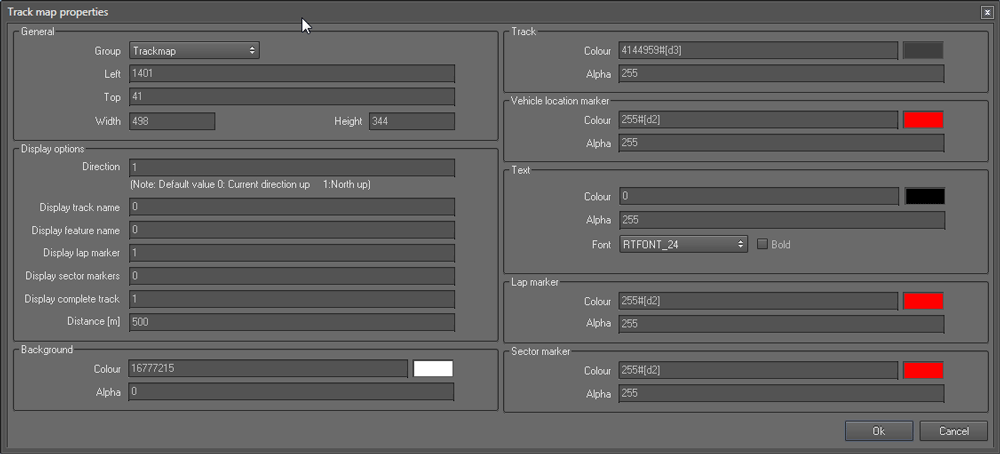
Track Map
This control is used to draw the path traversed by the vehicle.
Track Map Properties
General section
- Left and Top refers to the coordinates of the left and top border of the control.
- Width and Height refers to the display width and height of the map.
Display options section
- Direction : If you want to keep a consistent, locked orientation with north at the top, set this property to "1"
Set this to "0" to let track map rotate as the heading changes so that "up" on the map matches the forward direction of travel.
- Display track name : To display the track name, set this property to "1", to hide the track name set this to "0"
- Display feature name : To display the features, set this property to "1", to hide the features set this to "0"
- Display lap marker : To display the lap marker, set this property to "1", to hide the lap marker set this to "0"
- Display sector marker : To display the sector marker, set this property to "1", to hide the sector marker set this to "0"
- Display complete track : To display the compete track, set this property to "1", otherwise set it to "0"
- Distance (m) refers to the area displayed by the track map window in meters
Background section
- Colour refers to the background colour of the map
- Alpha refers to the transparency of the background colour. Values may range form 255 (opaque) to 0 (invisible)
Track section
- Colour refers to the colour of the track
- Alpha refers to the transparency of the track colour. Values may range form 255 (opaque) to 0 (invisible)
Vehicle location marker section
- Colour refers to the colour of the vehicle location marker
- Alpha refers to the transparency of the vehicle location marker. Values may range form 255 (opaque) to 0 (invisible)
Text section
This section contains the font related properties applied to the feature names and sector names.
- Colour refers to the colour of the font
- Alpha refers to the transparency of the text displayed. Values may range form 255 (opaque) to 0 (invisible)
- Font : Allows you to change the font size
Lap marker section
- Colour refers to the colour of the lap marker
- Alpha refers to the transparency of the lap marker. Values may range form 255 (opaque) to 0 (invisible)
Sector marker section
- Colour refers to the colour of the sector marker
- Alpha refers to the transparency of the sector marker. Values may range form 255 (opaque) to 0 (invisible)
 My basket |
Checkout |
Add to email list
My basket |
Checkout |
Add to email list




 Edit
Edit History
 Print
Print Download (.HTML)
 PDF
PDF