Using the SPEEDBOX-INS auto-levelling option
NOTE: This option applies to the single antenna SPEEDBOX-INS only. Firmware v3.6.3 or later is required on the INS unit, together with configuration software v4.1.5 or later on the PC.
The single antenna SPEEDBOX-INS includes an option to auto-level the antenna in software. This can be used to compensate for small offsets of pitch and roll from the horizontal when it is impossible to mount the antenna perfectly level relative to the vehicle. It is only recommended to use this to compensate for offsets up to approximately 5 degrees in either axis; beyond this a more level mounting should be sought should a level antenna be required. Note that using the auto-levelling is entirely optional; it is not necessary to use it at all. The advantages to using it are that when levelled correctly the output pitch and roll will have no constant offset due to the mounting orientation relative to the vehicle.
The auto-levelling system works as follows. When a specific command is sent to the SPEEDBOX-INS over the serial port, the SPEEDBOX-INS will read and average a short period of accelerometer data, and will calculate the pitch and roll offset based on this measurement. The levelling command should be sent only when the vehicle is level and stationary, in order that the only offset measured is that of the antenna relative to the vehicle. The levelling offsets thus acquired are stored in non-volatile memory for future use, and thus it is only necessary to re-send the command when the antenna assembly has been moved relative to the vehicle.
The levelling command will calculate and store an offset regardless of whether the offset is to be used or not. Whether the offset is used is a configurable option. When enabled, the stored pitch and roll offset is used to correct the sensed data in all six axes immediately following measurement, and prior to the measurements being incorporated into the INS mechanisation. Hence both the raw measurement output (accelerations, gyro rates) and the INS system output (attitude) are corrected.
The levelling command can be sent in one of two ways. First, ensure that the vehicle is level and stationary, and the antenna is mounted as required. Then, either:
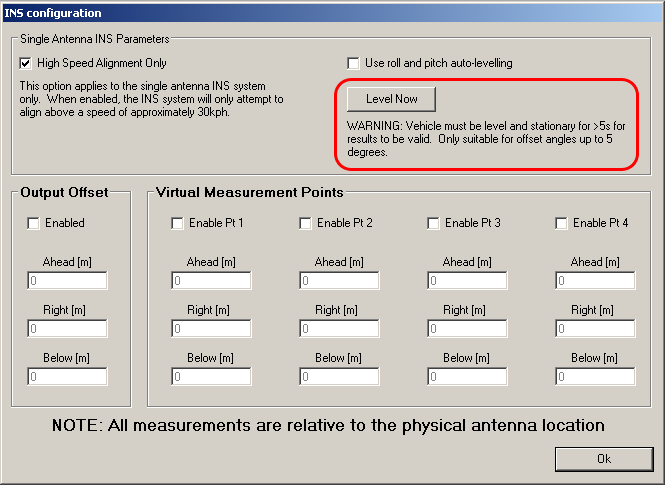
- Start the configuration software, and open the INS options tab. Press the "Level Now" button (figure 1). This can be done with the configuration software either connected or un-connected.
- Connect a special serial device supplied by Race-Technology to either one of the serial ports on the SPEEDBOX-INS. This device has a button fitted; when pressed it will send the level now command.
In both instances, the SPEEDBOX-INS will flash the blue trigger LED rapidly 3 times to confirm that the levelling calculation has been run, and then store the results. If the use of auto-levelling is enabled (see next section) then it can be verified using the Lite Monitor or CAN output that the longitudinal, lateral and vertical accelerations are 0, 0 and -1g respectively.
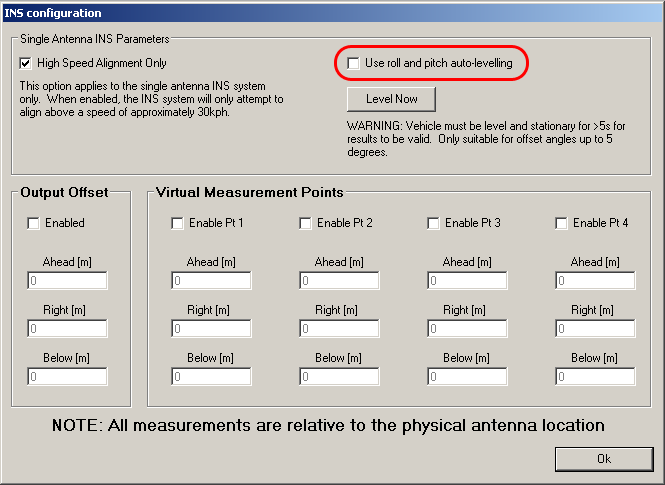
To enable or disable the use of the stored levelling data, start the configuration software, connect to the SPEEDBOX-INS, and open the INS Options tab. Either tick or un-tick the checkbox labelled "use roll and pitch autolevelling" as required (figure 2).
Note that the last calculated levelling data is still retained in memory even when this checkbox is unticked, so that it can be used again in future if required.
Figure 1: “Level Now” button
Figure 2: Checkbox to enable or disable the use of auto-levelling data.
 My basket |
Checkout |
Add to email list
My basket |
Checkout |
Add to email list




 Edit
Edit History
 Print
Print Download (.HTML)
 PDF
PDF