Introduction
Who is the VIDEO4 designed for?
The VIDEO4 was initially designed for autosport applications in drag racers, single seater racing cars, rally cars and road cars - it is, however, also ideally suited to use in power boats and on motorbikes. The unit may be used for all types of car testing within the auto-industry and can provide a vital tool for road safety and race training within driving schools.
What does the VIDEO4 do?
The VIDEO4 conducts the following, key functions:
• Takes video from up to four standard composite cameras
• Combines the video from the four inputs, in almost any combination, as picture-in-picture inputs
• Overlays a high resolution, full colour, fully configurable graphics overlay
• Records a synchronised data stream from any of our data logging products
• Stores both the video and the data to a single removable memory card.
PC software is supplied to:
• Configure the unit
• View the video on a PC (with no data)
• Generate a DVD from the video (complete with menus and titles)
• Perform detailed simultaneous analysis of the data and video using our powerful data analysis system
Video Overlay
The video overlay is of the highest quality. It is fully configurable to the user’s exact requirements.
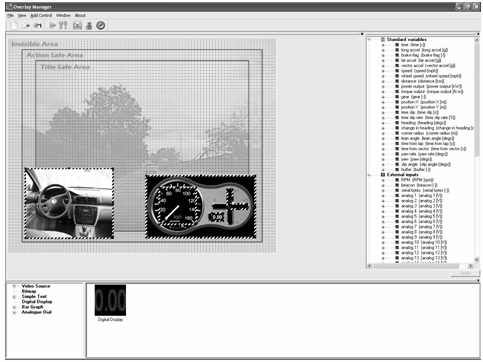
The following, graphic display methods may be user defined and added to the screen in a number of different combinations:
• Scaled video picture in pictures from up to three channels
• Simple fixed text
• Bitmaps
• Numerical values from the data (for example speed, temperatures, lap times)
• Dials (e.g. an RPM display)
• Bar-graphs
All the overlaid graphics are:
• 24 bit colour (with a maximum of sixteen million colours)
• Alpha blended, so that all graphics may be made translucent if required
• Anti-aliased, so that the graphics look smooth and professional
• Added at full D1/DVD resolution, so that they are as clear as possible
A PC program is provided with the unit. It will enable you to design the layout of the screen overlays to meet your needs. Once this has been done, the layout is simply uploaded to the VIDEO4. If no overlay is required for a particular application then it can, of course, be left blank.
Video format and quality
The VIDEO4 records both video and audio data to the same standard as a DVD. It is in the same format as most digital TV broadcasts. In technical terms this means that:
• The video is stored at D1 (DVD) resolution using a very high quality MPEG2 encoder (see the FAQ section on different encoding methods).
• The audio is encoded as stereo (16 bit / 48k) and encoded with MP2. It is therefore comparable with CD quality.
• The video and audio are combined into a standard MPG file that can be played by most PC based players. They can also be copied onto a DVD that most hardware players will allow you to view.
Data/Video synchronisation
One of the key advantages of the VIDEO4 is its ability to store perfectly synchronised video and data. To do this, the VIDEO4 takes the data from any of our data-logging products – via it’s built in data port - and stores it along side the video. As the VIDEO4 receives the data, it decodes it and adds in details of the frame of video that is currently being stored. When the data is subsequently decoded, the software knows exactly which frame of data should be displayed.
 My basket |
Checkout |
Add to email list
My basket |
Checkout |
Add to email list




 Edit
Edit History
 Print
Print Download (.HTML)
 PDF
PDF